
Guide
TikTok Banner Maker
A good banner is planned for three posts, not one. This page covers what goes into the design; when it's ready, open the TikTok banner maker & splitter and split your banner image into tiles.
Start with one message
Visitors see your banner for a second or two while they decide to follow. Give it one job: your name and niche, a launch, a sale or an event. Write that message in five words or fewer before you open any design tool.
Read across the three tiles like a sentence. The left tile is read first, so put the hook there and the detail or call to action on the right.
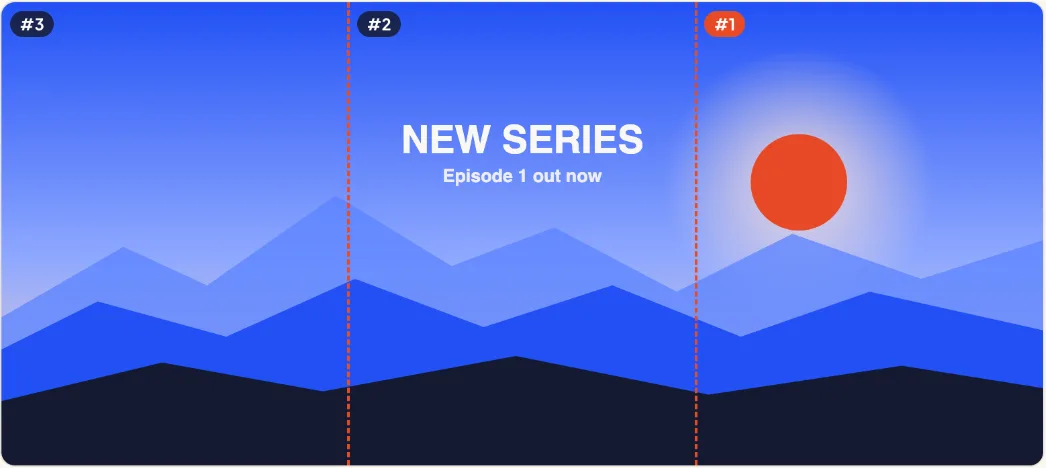
Lay it out for three tiles
Design on a 3240 × 1440 canvas and draw two guides at 1080 and 2160 px — those are the cuts. Treat each third as its own post: it should still make sense when someone sees it alone in a feed.
Left: the hook
A face, a logo or the first word of your message.
Center: the main image
The product, the scene or the biggest text. It's the tile people look at most.
Right: the detail
A date, a price or 'new videos every Friday'.
Across: one background
A landscape, gradient or pattern that runs through all three tiles is what makes it read as one banner.
TikTok banner ideas by niche
Not sure what to put on your banner? Start from what your followers come for. These patterns work because each tile still makes sense alone, while the three together tell visitors what your account is about.
Creators and personal brands
Your face on the left, your name or handle in the middle, and what you post on the right: 'Daily cooking in 60 seconds'.
Shops and product launches
The product in the center tile, the drop date on the right, and a lifestyle shot or logo on the left. Swap it for the next launch.
Gaming and streaming
Game art across all three tiles with your stream schedule on the right tile, so new viewers know when to come back.
Events and tours
Event name across the middle, city and date on the right. Keep the left tile simple so it still reads as a normal post in feeds.
Quotes and series
A short quote split into three phrases, one per tile, or the title of a video series with 'Part 1, 2, 3' visuals.
Fonts and text size
Thumbnails on a phone are small — about a third of the screen width each. Use a bold sans-serif at least 120 px tall on the 1440 px high canvas, and no more than two fonts. Thin script fonts disappear at that size.
Keep every word inside one tile. The grid leaves a thin gap at each cut, so a word that crosses it looks broken. The splitter's seam check flags text on a cut line.
Leave room at the edges
TikTok puts the view count in the bottom-left corner of every tile and a Pinned label in the top-left once you pin. Leave about 6% of each tile clear of faces and words, and put the important parts in the middle band.
High contrast between text and background matters more than colour choice. Test it by shrinking your design to a 360 px wide image: if you can still read it, it works on a profile.
Size and export
Export the design as a 3240 × 1440 PNG or high-quality JPG. Any wide image works — the splitter fits or fills it to that shape — but the exact size keeps text sharp.
Want six or nine posts? Design 3240 × 2880 for a 2×3 grid or 3240 × 4320 for 3×3. Every tile is 1080 × 1440. Full table: TikTok banner size.
Checklist before you export
Run through this list before you bring your design to the splitter. Each point prevents a mistake that is easy to miss on a large canvas and obvious on a small phone screen.
Canvas is 3240 × 1440
Or 3240 × 2880 for 2×3 and 3240 × 4320 for 3×3. Other sizes work, but the exact size keeps text sharp.
No words on the cut lines
Check the guides at 1080 and 2160 px. Every word should sit fully inside one tile.
Corners kept clear
Leave the bottom-left and top-left corners of each tile free for the view count and the Pinned label.
Readable at phone size
Shrink the design to 360 px wide. If you can still read it, so can your visitors.
Exported as PNG or high-quality JPG
Avoid heavy compression: blocky edges show up on text first. Then split your banner image and check the seams.
Which tool to design in
Any editor that exports a large image works: Canva, Figma, Photoshop, Procreate or a phone app. Set the canvas to 3240 × 1440 and place the two guides. Then bring the export to BannerSplitter to cut, check and number the tiles.
FAQ
Is a TikTok banner maker the same as a splitter?
Making is designing the wide image; splitting is cutting it into the three posts. BannerSplitter does the splitting and checks the result; design in any editor you like.
What should a TikTok banner say?
One short message: who you are and what you post, or the launch, sale or event you are promoting right now.
Can I make a banner from a normal photo?
Yes. Any photo can be split into three tiles; a wide landscape photo works best because it already reads left to right.
Do sticker banners work the same way?
No. Sticker banners use TikTok's stickers tab, which works differently; this site makes banners from regular posts.
How long does it take to make a TikTok banner?
With a ready photo, a few minutes: set a 3240 × 1440 canvas, add your message, export, then split it. Designing from scratch with your own photos and text usually takes 20 to 30 minutes.
Should I change my banner often?
Change it when your message changes: a new launch, a new series or a seasonal sale. A banner that stays for months works best as a profile header that explains who you are.
Can I use the same design on Instagram?
Yes. Instagram's profile grid also shows 3:4 tiles in rows of three, so the same 3240 × 1440 design and the same three tiles work there too.