
Guide
TikTok Banner Splitter
Everything the splitter does, and why. Ready to make one? Open the TikTok banner maker & splitter — it runs in your browser and takes about a minute.
What is a TikTok banner splitter?
A TikTok banner is not a setting in your profile. It is three ordinary posts whose covers line up into one picture across the top row of your profile grid. A banner splitter takes one wide image and cuts it into those three covers, sized so the seams meet exactly.
BannerSplitter does the cutting, numbers the files in the order you need to post them, and checks the result before you publish: whether text crosses a cut, whether a face sits under the view count, and whether each tile still reads on its own.
It is not a profile background tool. TikTok has no background image slot, and BannerSplitter never asks for your login or connects to your account. Tools that promise to "unlock" a profile background are a different thing.
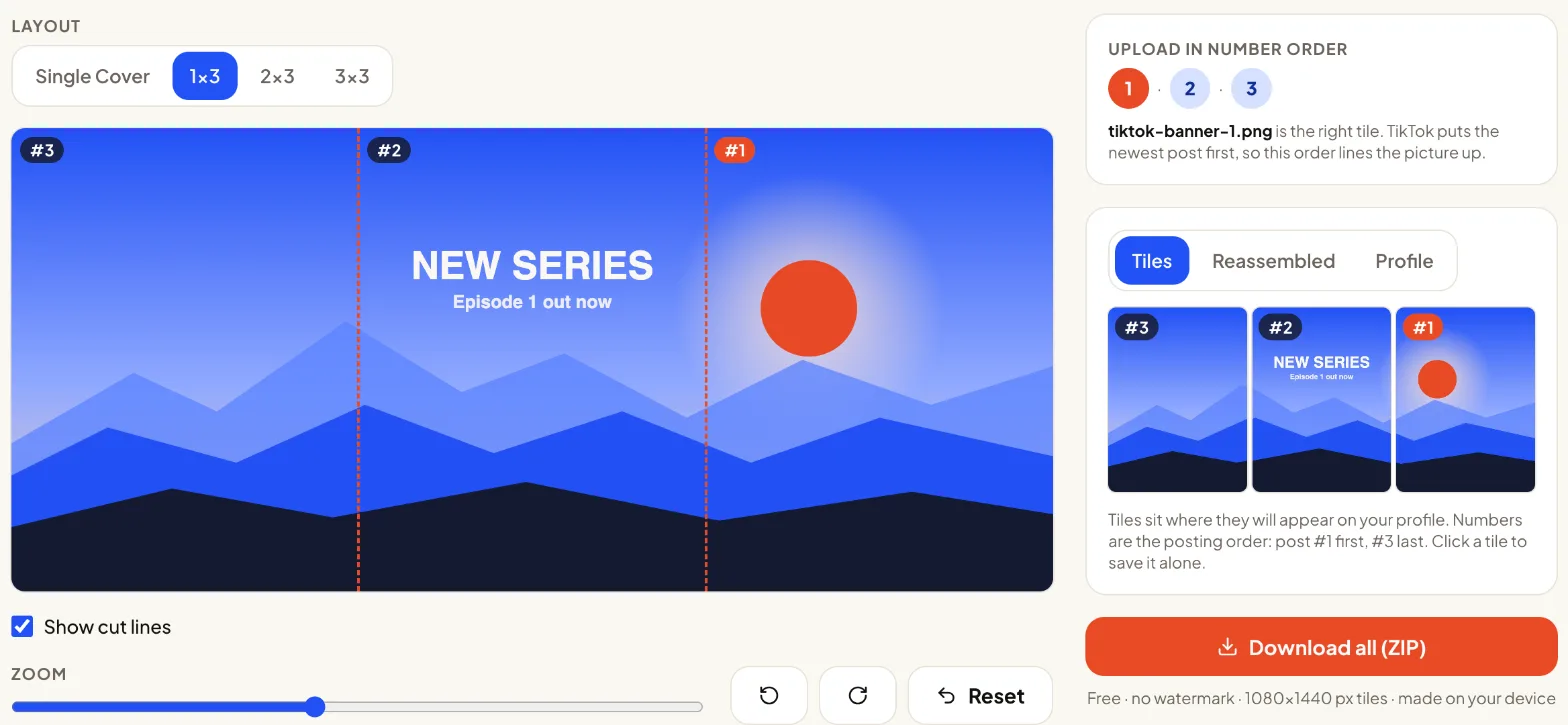
How to split a banner into 3 for TikTok
The whole job takes three steps, all on the splitter page. The screenshot below shows the editor after step 1.
1. Upload one wide image
Choose a file, drag it in or paste it. 3240 × 1440 px fits exactly; anything else is fitted or filled to that shape.
2. Frame it and check the seams
Drag and zoom while the profile preview updates. Move text and faces until the seam and safe-zone checks turn green.
3. Download and post right to left
The ZIP holds tiktok-banner-1.png to tiktok-banner-3.png and a README with the order. Upload number 1 first, then pin all three.
TikTok banner size: 3240 × 1440 and safe zones
Posts on TikTok are tall (9:16), but the profile grid shows only a 3:4 window from the middle of each one. Three 3:4 tiles side by side make a 9:4 strip, which at full resolution is 3240 × 1440 px — three tiles of 1080 × 1440.
Two areas of every tile get covered: the view count at the bottom left, and the Pinned label at the top left once you pin the post. Keep faces, logos and words out of the outer few percent of each tile. The splitter's safe-zone check looks at exactly that band.
All layouts and their pixel sizes are in the TikTok banner size guide.
Layouts: Single Cover, 1×3, 2×3, 3×3
Pick the layout by how many posts you want the picture to span.
Single Cover
One 1080 × 1440 tile. Use it to make one video cover fit the grid without a cut-off title.
1×3 banner (default)
Three tiles across the top row — the classic TikTok banner. Downloads as one ZIP with a README.
2×3 grid
Six tiles over two rows for a taller picture. Free, like every layout.
3×3 grid
Nine tiles, a full-screen mural. Only three posts can be pinned, so the lower rows move when you post again.
Fit or Fill: keeping the whole photo vs edge-to-edge
Fill scales the image until it covers every tile edge to edge, so some of it is cropped at the top and bottom or the sides. Drag to choose which part stays. It is the default, because most banners look best without borders.
Fit keeps every pixel of your image and fills the leftover space with a blurred copy, a gradient from its edge colours, or plain white or black. Use it for group photos and artwork where nothing may be cropped.
Checking your banner before you post
Cutting is the easy part. What goes wrong on real profiles is a word split across two posts, a face hidden under the view count, or a middle tile that is just sky. BannerSplitter runs three checks in your browser every time you move or zoom, and shows them as green, yellow or red lights with a sentence about what to fix. Click a light to see which tile it means.
Seam check
Measures fine detail in a narrow band either side of each cut. Lettering and sharp edges across a seam turn it yellow or red.
Safe-zone check
Looks at the outer band of every tile, where TikTok's labels sit, and warns about busy detail there.
Tile readability
Each post is also seen by itself in the feed. A tile with almost nothing on it gets flagged.
Reassembled preview
The Reassembled tab puts the tiles back together edge to edge, with or without the gaps the grid leaves, so you can see the seams meet before you download.
Three ways creators use a three-tile banner
Launch or campaign row
Announce a product, a drop or an event with one picture that greets every profile visitor.
Creator profile header
Your name, face and what you post about, as the first thing people see above your videos.
Story or reveal sequence
Three posts that each work alone and join into one scene when someone opens your profile.
Common mistakes
Text across a seam
A gap of a few pixels between tiles cuts letters in half. Keep words inside one tile.
Posting the left tile first
The newest post appears on the left, so starting with the left tile gives you a mirrored banner. Upload tiktok-banner-1.png, the right tile, first.
A tile with nothing on it
Each post also shows alone in feeds and search. Give every tile something to look at.
Not pinning
Any new post pushes the banner along by one. Pin the three tiles to keep them on top. See how to post a banner, step by step.
FAQ
Is this a TikTok profile background tool?
No. TikTok has no profile background. The banner is three posts that line up in your grid. BannerSplitter only cuts your image and never connects to your account.
What size should my image be?
3240 × 1440 px for a 1×3 banner. Other sizes are fitted or filled. See the banner size guide.
Why is the right tile number 1?
TikTok shows the newest post first, at the top left. Posting right, then center, then left makes the picture read correctly.
How many posts can I pin?
Three, which is exactly one banner row. Pin them in number order so the right tile stays on the right. Details in how to post.
Can I keep the whole image without cropping?
Yes, use Fit. It keeps everything and fills the spare space with a blur, a gradient or a solid colour.
What is the difference between 3:4 and 9:16 tiles?
3:4 tiles (1080 × 1440) are exactly what the grid shows. 9:16 tiles (1080 × 1920) add space above and below so each post also fills the screen when opened.
Are my photos uploaded?
No. Everything runs in your browser; nothing is sent to a server.
Is there a watermark?
No. Every layout is free without a watermark, and there is no limit on how often you use it.
Can I split a video?
Not yet. Video banners are planned as a separate page, so the image tool stays fast.
Does it work on my phone?
Yes, in current Safari and Chrome. HEIC photos open in Safari; other browsers may need a JPG.
Can it make a 3×3 grid?
Yes. Choose 2×3 for six posts or 3×3 for nine, and download them free like the 1×3 banner.
Is BannerSplitter made by TikTok?
No. It is an independent tool and is not affiliated with, sponsored by, or endorsed by TikTok.
How do I split an image into 3?
Open the splitter, add your image and keep the 1×3 layout. The download gives you three equal 1080 × 1440 tiles, numbered in the order to post them.