
TikTok Video Banner Splitter
Turn one clip into three posts that play side by side at the top of your profile. Pick the moment, drag the frame and get numbered MP4s with matching covers. For photos, use the TikTok banner maker & splitter.
- No upload
- No watermark
- Free
or drag it here · MP4, MOV, WebM or GIF · up to 60 s per banner
On your profile: 3 pinned posts, playing
What a video banner is
A video banner is one clip cut into three, six or nine separate posts. On your profile, TikTok shows every post as a 3:4 thumbnail, so when the pieces sit next to each other the thumbnails join into one wide picture. Because each piece is a real video, the banner can move when someone opens a post, and the covers you pick decide what the grid shows.
The splitter crops all pieces from the same seconds of the same clip, so the motion stays in step from tile to tile. It works like the photo splitter, but its output is MP4 video instead of PNG images.
How to split a video into 3
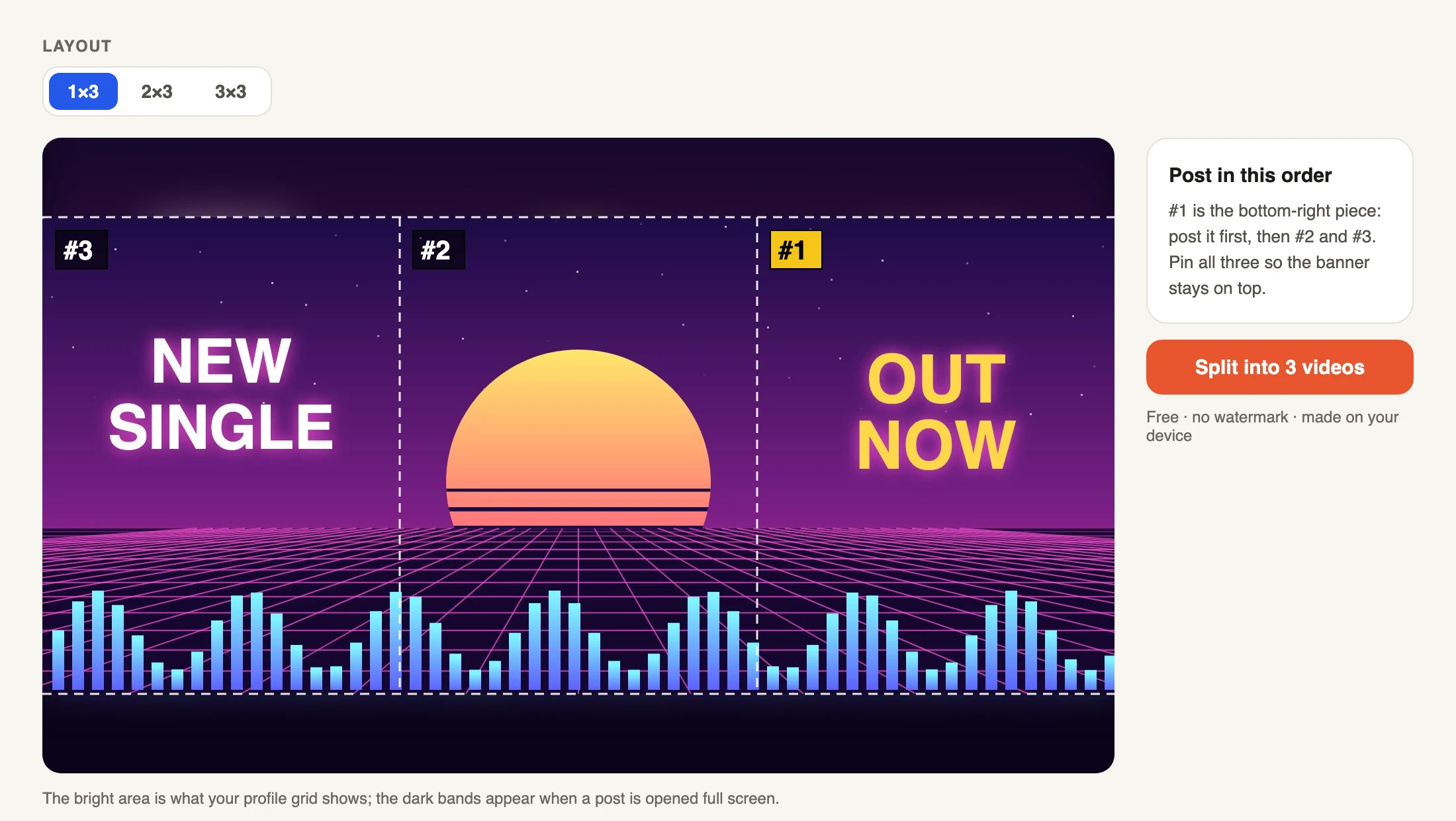
Choose a video above. MP4 and MOV from a phone or screen recorder work best. The editor shows the frame at the start of your clip with the cut lines and posting numbers on top.
Pick 1×3 for one row, or 2×3 and 3×3 for a bigger grid. Drag the picture to place it and zoom until the important part sits inside the bright area. Set the start and the length; up to 60 seconds, and 5 to 15 seconds is plenty for a banner.
Press Split. Each piece is encoded on your device, one after another, so keep the tab open and on screen. When it's done, save the videos to your phone or download them all as a ZIP with a README that lists the posting order.
Video size and the hidden bands
Each piece is a 1080 × 1920 px (9:16) MP4 at 30 frames per second, the shape TikTok uses for full-screen posts. The profile grid only shows the middle 1080 × 1440 px of each post. Those middle windows are what line up into the banner; that is the bright area in the editor.
The 240 px above and below each window only appear when a viewer opens the post. The splitter fills them with the video around the window, or a soft blur at the outer edges, so an opened post never has black bars. Keep faces and text out of those dark bands. Exact numbers for photo banners are on the TikTok banner size page.
Covers: pick the same moment
TikTok shows each post's cover in the grid, not the first frame. If the three posts use covers from different moments, the banner falls apart. The splitter saves a JPG cover for every piece, all cut from the middle of your clip.
When you post each video, tap Edit cover and choose the matching JPG from your photos, or pick the same second in every video. Do this for all three before you pin them.
Posting and pinning order
TikTok puts the newest post at the top left. So you post the bottom-right piece first: tiktok-video-banner-1.mp4, then 2, then 3. After the last one, pin all three from the post menu so new uploads don't push them down. The full walkthrough is in how to post a banner on TikTok.
Only three posts can be pinned. A 2×3 or 3×3 grid uses your newest normal posts, so every new upload shifts it by one tile. Use bigger grids on a profile you don't post to often, or post the next row on purpose.
Private by design
Your video never leaves your device. The browser decodes it, draws every frame and encodes the new MP4s with its built-in video encoder (WebCodecs). There is no upload, no account and no watermark. It needs a recent Chrome, Edge or Safari (iOS 16.4 or newer).
Long or 4K clips take longer and use more memory. If a phone struggles, choose a shorter length or export the video at 1080p first.
FAQ
Is the video banner splitter free?
Yes. Split as many videos as you like, with no watermark and no sign-up.
Why is there no sound in the files?
Three posts playing the same audio would clash, and TikTok lets you add music when you post. Add a sound in the TikTok editor, or leave the banner silent.
How long can the clip be?
Up to 60 seconds, cut from a video of any length up to 1 GB. Short loops of 5 to 15 seconds work best for banners.
Can I make a sticker banner with this?
Stickers are a separate TikTok feature. This tool makes banners from regular posts; you can still use the same pieces anywhere else that takes 9:16 video.
Does it work on iPhone and Android?
Yes, in Safari on iOS 16.4 or newer and in Chrome on Android. On iPhone, Save to Photos puts the videos in your library; on Android they go to Downloads, which your Gallery shows.
Can I split a photo instead?
Use the TikTok banner maker & splitter for photos and designs; it exports 1080 × 1440 PNG tiles and checks the seams.
Can I split a GIF?
Yes. Choose a GIF instead of a video. It is turned into MP4 pieces on your device; short GIFs repeat in whole loops so the banner keeps moving without a jump.
Banner from a photo?
Split any image into 3, 6 or 9 tiles with seam checks and posting order.